 An Xkye Solutions case study, in development with Monesco, our founding customer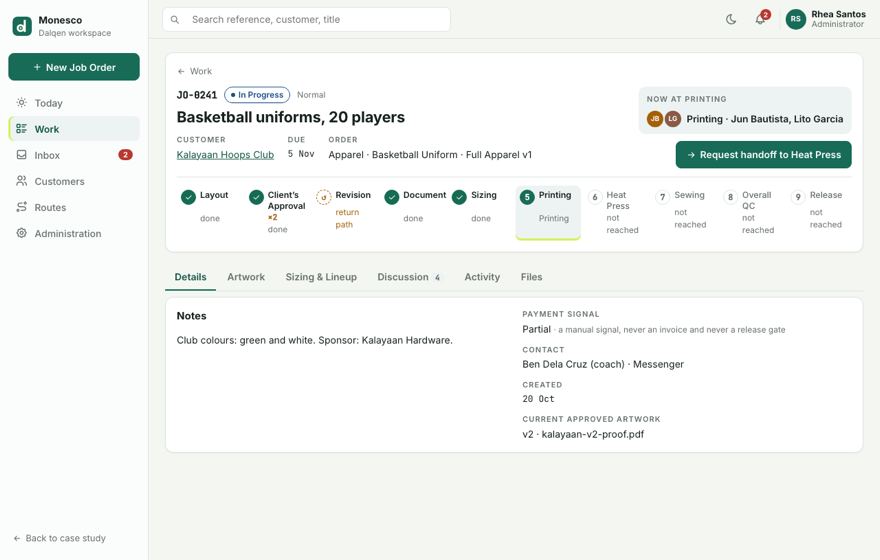
A busy shop, run from a spreadsheet and memory.
Monesco is a custom printing and apparel shop. Its jobs move between departments, Layout, Printing, Heat Press and Sewing, before they go back to the customer.
Today, every job lives in a live spreadsheet. Client approvals happen over Messenger, Facebook and WhatsApp, and departments pass work along by word of mouth.
Dalqen is the tool we’re building with Monesco to replace that. It’s in development, and the prototype beside this text is a clickable imitation of it with made-up data.
Dalqen is a desktop and tablet tool, so the prototype is easier to use on its own, full screen.
Nobody can say where a job is.
A spreadsheet holds the list. Everything that happens to a job happens somewhere else, so three questions keep coming back.
Which stage is it in, and who has it?
A job between Printing and Heat Press is on somebody’s table. Whose, and since when, is a question for whoever is nearby.
Which artwork is the approved one?
Proofs and the client’s replies sit in chat threads. “The latest one” is whichever someone scrolled to.
Did one jersey fail QC?
Twenty jerseys pass and one doesn’t. Holding back the order, or letting it go, depends on someone remembering which one.
One Job Order, not a folder of Projects.
Discovery started by walking through Monesco’s live spreadsheet: what a job is, who touches it, and what happens when it comes back.
Our first model nested Projects inside an order. One request held several Projects, each with its own route, assignee, artwork and sizing. On paper it was flexible. In practice it meant an order could be in several states at once, so “where is this job?” had more than one answer.
We replaced it before building any of it. A Job Order is now one indivisible unit, with one Category, one Order Type, one Route, one current stage, one QC outcome, one release and one Discussion.
A mixed request becomes separate Job Orders, one per Route. Each moves at its own pace and has its own answer.
Starter Routes, not hard-coded ones.
Dalqen comes with five starter Routes, shaped with Monesco. They’re starter content a shop edits in a builder, not behaviour written for one customer, so each shop, Monesco included, starts from them and changes what’s different.
- Full ApparelLayout · Approval · Document · Sizing · Printing · Heat Press · Sewing · QC · Release
- Print & PressLayout · Approval · Document · Printing · Heat Press · QC · Release
- Print Only / DTFLayout · Approval · Document · Printing · QC · Release
- SubconLayout · Approval · Document · Subcontracting · QC · Release
- TarpaulinLayout · Approval · Document · Printing · Finishing · QC · Release
- Publishing changes future Job Orders only. An order in flight keeps the Route version it started on, so nobody’s job changes path halfway through.
- Category, Order Type and Route are separate on purpose. A Basketball Uniform can be made in-house on Full Apparel or sent out on Subcon without changing what was sold.
- Revision is a return path, not a step on the way. It’s drawn dashed, and only a rejected artwork version goes there.
The draft beside this text adds an optional Packing stage after Sewing. Publish it and check how many orders keep v1.
A new Job Order
The key flows follow one order from start to finish: JO-0241, basketball uniforms for the 20 players of the Kalayaan Hoops Club, a made-up team. It starts at intake, with a customer, a Category, an Order Type and a Route.
Choose Basketball Uniform and Full Apparel is already selected, because it’s that Order Type’s default Route. The new order lands in Layout’s Incoming queue at the first stage, Not Started.
- The Order Type narrows the Route. Basketball Uniform allows Full Apparel or Subcon and defaults to Full Apparel, so the desk rarely has to choose.
- A reference is given once.
JO-0241names this order everywhere: on the board, in a mention, and at the pickup counter. - Not Started is a real state. An order waiting in Layout’s queue looks different from one somebody is working on.
Artwork you can measure
Every upload is a numbered Artwork version, and the client’s decision is recorded against that version. Paolo in Layout has uploaded v1.
The coach rejects it: bigger numbers, and the sponsor logo goes on the back. The order moves to Revision, a stage everyone can see. v2 comes back with bigger numbers, is approved, and becomes the one Current Approved version.
- Exactly one Current Approved. Every version is kept, but only one is the version Printing works from.
- A rejection needs a reason. The client’s words stay with the version they were about.
- Rulers measure the print, not the screen. Edge rulers and the grid use the file’s physical size, in inches or centimetres, and zooming never changes a measurement.
- No size, no ruler. A logo file without a physical size says “Ruler unavailable for this file” instead of guessing.
Handoffs that can’t drop work
Sizing is done, so Layout asks Printing to take the order. JO-0241 shows up in Printing’s Incoming column, and nothing moves until Printing says so.
Carmela, the Printing lead, opens the order and checks the package: the approved artwork, the production document and the lineup. Then she either accepts it and picks the crew, or sends it back with a note about what’s missing.
- The receiving department accepts its own work. A handoff is a request, not a push.
- Responsibility moves on acceptance. Until Printing accepts, Layout still has the order, so it’s never between departments with nobody’s name on it.
- A rejection carries a note. “Lineup is missing a size for #12” goes back to Layout with the order and stays in Activity.
Talk and history, kept apart
Discussion is for people: comments, @mentions, replies, and chips that point at an artwork version. Activity is the order’s record: stage moves, handoffs, artwork decisions, QC results and the release, grouped and credited to whoever did them.
The two never mix. A comment can’t be mistaken for a decision, and a decision is never buried between comments.
- Discussion is human-only. The system never posts there, so every line in it was written by a person.
- Mentions only offer people who can see the order. Nobody gets pulled into a job they can’t open.
- Activity is written by what people do. Nobody types into it, so it can be trusted as the history.
QC per jersey, then release
Overall QC is recorded per lineup item. Jun from Printing has passed 19 of the 20 jerseys, and number 7 is the one left.
When #7 fails with an issue, the order stays in Overall QC and the 19 that passed stay passed. After the repair, #7 is rechecked and passes, and the order becomes Ready for Pickup.
Release is for the whole order. The front desk records who received it, and is asked for the manual Payment signal, which never blocks the handover.
- A fail belongs to one item. It holds the order in QC without undoing anyone else’s passes.
- A recheck keeps the history. Fail, then Pass, both stay on #7’s record.
- Release needs a name. “Received by” is required. Payment is a signal, not a gate.
Workshop green, and status you can read without colour.
The design system is in progress. Every colour is a token with a light and a dark value, and dark mode ships with the first version, not after it. The mark on this page is interim: Dalqen doesn’t have a brand yet.
Tokens, light and dark
#176B57#3FD6A8#D7F05E#D7F05E#F3F6F1#101614#FFFFFF#1A211E#17211F#F2F4F3#66706D#A3ABA7#DDE4E0#2A322E#B7392F#FF6B5E#A55F08#F0A93B#166B53#4FD1A5#1C4E8A#7FB2F0Type
References and sizes use tabular figures, so columns of numbers line up.
Status, with a word every time
Colour is never the only signal. Every pill carries its word, and the stage stepper uses a number, a check, or ↺ for a return path.
Interim mark
 Colour
 Reverse
What the design holds itself to.
These are design targets, not measured results. Dalqen is in development and hasn’t been used on Monesco’s floor yet, so there’s nothing to measure.
Every Job Order shows its stage and the people responsible for it.
Printing never has to guess which proof the client said yes to.
A handoff is accepted or sent back with a note. Until then, the sender still has it.
One failed jersey is fixed and rechecked while the 19 that passed stay passed.
The most useful decision was a reversal. Nested Projects looked flexible on paper, and we replaced them with one Job Order before building any of it. Having a founding customer’s real process in front of us made that an early, cheap call instead of a late, expensive one.